
How to Order & Use Your lunarmarketids.com Card
Everything you need — photo rules, ordering steps, payment instructions, and support contacts — all in one place.
Photo Requirements
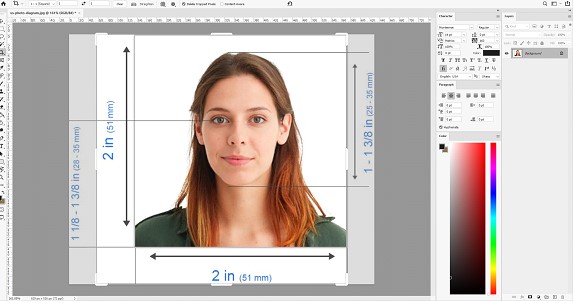
Your photo is the most critical part of your card. Follow these 6 rules for a clean, natural-looking ID portrait.
Selfies are fine — no professional camera needed
Full face visible — nothing blocking eyes, nose, or mouth
Entire head in frame with a little space above the top
No glasses, sunglasses, headphones, or hats
Background doesn't matter — we'll edit it to clean white
Neutral expression — no wide smiles or squinting
How to Place Your Order
The full process takes less than 5 minutes. Here's exactly what to expect.
Pick Your State or Document Type
Go to the Order page and choose from our full catalog — US states, Canada, UK, CDL, Passport Card, and more.
Select Your Quantity
Choose how many cards you need. More cards = lower price per card — from $120 for 1 down to $95 each for 10+.
Enter Shipping Details & Delivery Speed
Provide your delivery address and choose Standard ($20), Express ($50), or Overnight ($100) shipping.
Choose a Payment Method & Checkout
Select CashApp, Cryptocurrency, or Gift Cards and complete your order. Payment details are sent to you after confirmation.
We Confirm Your Card Details
Our team contacts you to collect your photo and verify all card information before production begins.
Receive Your Card
Your card ships in discreet, unmarked packaging and arrives within your chosen delivery window. Tracking number included.
How to Pay for Your Order
Three fully anonymous methods — no bank records, no personal exposure. Payment details are shared after checkout.
- After checkout, we'll send you our CashApp $cashtag via email or chat
- Open CashApp and tap the $ icon to send money
- Search for the $cashtag we provided and select it
- Enter the exact order total — double-check before sending
- In the note field, type your order number or name
- Tap Pay to complete the transaction
- Screenshot the confirmation screen and send it to us — production starts immediately
- We accept Bitcoin (BTC), Ethereum (ETH), Litecoin (LTC), USDT, and most major coins
- After checkout, we'll send you a wallet address for your chosen coin
- Open your crypto wallet app and tap Send
- Paste our wallet address — never type it manually to avoid errors
- Enter the exact USD amount converted to crypto at current rate
- Review all details carefully before confirming
- Copy the transaction hash (TXID) and share it with us for instant verification
- We accept Steam, Razer Gold, and Amazon gift cards
- Contact us first to confirm the exact denomination(s) needed
- Purchase the gift card from any authorized retailer — online or in-store
- Scratch off the code slowly and carefully — a damaged code cannot be used
- Photograph both the front and back clearly, with the code fully visible
- Send us the photo and the full redemption code via email or chat
- Wait for our confirmation before we begin production